
How to Web Check-In (Cebu Pacific)

This is not something really new. Cebu Pacific‘s Web Check-In feature has been around for quite sometime. More so for international airlines who have had it way earlier. I’ve tried it first with Singapore Airlines early this year in Singapore but only documented it now via this blog for sharing; in time for my flight to Malaysia later.
Basically, Cebu Pacific’s ‘web check-in‘ is getting the traditional face-to-face ‘check-in‘ from the airports and bringing it ahead through an online transaction to reduce the usual physical lines.
To further encourage this, local airlines such as Cebu Pacific has installed special airport check-in lines for those who have checked-in via the web.
This takes away the burden of queuing in long lines or waiting for counters to open in case you arrived at the airport way ahead of time. (Usually, airline counters open only 2.5 hours before boarding time; 3 hours at most)
How to Web Check-In (via Cebu Pacific)
1. Go to Cebu Pacific Website http://www.cebupacificair.com/ and click “Web Check-In” under “Manage Booking.”

2. You would be asked to choose from among options and enter details to identify your specific booking. Select “Submit”

3. In the “Web Check-in” tab, you will see details of your flight.
4. Click on “Select Seat” links to, well, select your seat. (do the same for all passengers in the booking)

5. Answer some luggage/baggage-related questions (these are basically for handling and immigration purposes; use ‘common sense’ but answer them with care)
6. Mark with a ‘check’ (select) the ticker box at the bottom agreeing “Yes, I have read…..restrictions,” and click “Check-in Now”
7. Print Boarding Pass by selecting “Print Boarding Pass” links.
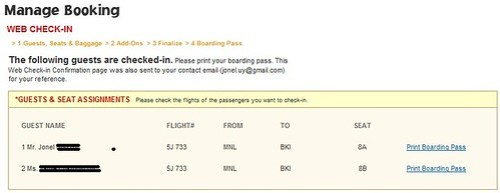
If you did everything right, you’re done! 🙂
One Side-Comment

Personally, I just find Cebu Pacific’s current promo saying “Check-In online….and get an assigned seat for free! ” a little weird. Because when you try to select a different “regular” seat than was “assigned,” you are charged Php100 (about US$2). I know this is how it is even before, but the wordings of the “advertisement” is quite misleading.
Since the assignment is automated and the customer cannot change it anyway, it’s pretty useless. Of course, customers will expect to be assigned a seat (just like in traditional check-in) unless they allow standing passengers during plane take-off and landing. So I can’t find where the impression of ‘free’ benefit is.

In fact, this would be one advantage of the “traditional check-in.” I can always ask the counter personnel to get me any available window-seat for free in the real sense of the word.
Basic Web Check-in Service Guidelines (excerpts from CEB website)
1. When will the web check-in service be available?
Cebu Pacific web check-in service is already available in all of Cebu Pacific Airbus flights systemwide. You may check-in online for your flight 48 hours up to 4 hours before departure time.
2. Is there a web check-in fee?
There is no fee for checking in online.3. Are there restrictions on the web check-in service?
Aside from the time restriction of 48 hours up to 4 hours before departure time, there are certain cases wherein we disallow web check-in as these would entail special handling. These are:
- Expectant mothers
- Unaccompanied minors
- Guests with reduced mobility, persons with disabilities and those with special needs
- Guests with infants
- Medical cases
- Group of 10 or more under 1 record
Final Reminders
Further remember that after you have checked-in online, flight changes and cancellations are no longer allowed.
Nice! We’ll use this when we go to Bora this summer.
Aba sir, pa-bora-boracay ka na ngayon ah! 😛
Haha! First time lang…kasama whole family. 🙂
Kapag hindi ko naprint yung boarding pass ko, will they print it for me for free?
Yes @Ayokongmag-pakilala,
Bring your Ids and other travel documents such as passport and they can print the boarding passes for you. 🙂
hello.. what if nka web check in na, tapos on the day of your flight, cancelled kasi bad weather. pde pa kaya ma rebook? thank you..
I want to try this for my flight this January 21, but I have a question, I don’t have a printer to print my boarding pass, can I temporarily save the boarding pass in a file and have it printed later? Also, do I need to have a credit card to pay the PHP 100 fee for the seat? How can I pay (other means) if I don’t have one? Thanks!!!
Hi sir..if flight po Ay sa May 6,2016..pwede po bang mag check inonline ng Thursday night?tska do I need to print my boarding pass?or ok na isave na lng sa phone?
Boarding Pass
Yes, they can print it for you
Seat Payment
I haven’t tried purchasing the seat so I’m not sure how to pay through other means other than credit card. 🙂
can i re-print the boarding pass? nag-jam kasi printer ko, di ko na makita ulit sa web check-in yun boarding pass ko, thanks
Your web check in detail is still in your account.
You should be able to reprint from there. 🙂
it doesn’t send an email for the boarding pass, i have the option only to print but unfortunately the printer was jammed, anyway i can still get the boarding pass in the airport, right?
I’ve tried it several times and it does not work. after clicking submit in the web check in, what appeared is the itinerary receipt, purchase bag, purchase add ons. No select seat link, luggage questions, print boarding pass appeared. It was just the flight details and print itinerary receipts over and over again no matter how I tried.
Something wrong with the system perhaps?
@A Friend –
Yes, you cans till get the boarding pass at the airport.
@Brenda –
Yes, you can try that in your Cebu Pacific Web Check-In.
You may also try switching / using other internet browsers.
Just wanted to share a very sad experience with this.
I was able to use this service before without any trouble or fees.
I used the web check in service for our flight last saturday and just used the assigned seat for us since I noticed that the system generated seat had us seated together. I never got to the portion to select a particular seat since I dont want to pay the 224 pesos (100 plus vat x 2). I printed our boarding pass and went to the airport on time. We went directly to the web check in counter to check in our bags and had a good flight.
Now here is the very weird part. On our return flight the next day (I did not use the web check in service for this one)we lined up to check in and when guy is checking us in, he said that we must pay P224 pesos for the seat fare on our previous flight since we used the web check in services. I said I did not use the seat selection part just the system generated seat. He said that we have to pay or else they wont check us in. Of course the line got longer behind us. I said why do we have to pay now and the one who checked us in the previous day did not mention anything about those fees. I also said that why did the system let me do it (change my seat) without even paying. He said that a credit card was used and it says it was declined. What! This is insane. I never got to the point in selecting our seat and not even a hint of a credit card entry then he is telling me i used my card. I asked what card was used. He said he can’t tell. I said it’s a system error. They just keep on telling us “That’s what’s seen in the system.” Now it’s the my word against the system!
We were just told to pay so they can check us in and then call the customer service. I will not do that I said. I had numerous unforgetable insane experience when calling their hotline. So we just filled out a complaint form. I said I’ll use my credit card in paying since we are short of cash and just reverse it just in case (asa pa ako). Then the supervisor told me that the minimum amount for cc is P500! So we have to extract every penny we had then. Of course they are the boss not the customer (cant make even an exception for this).
Right now we are at their mercy if they will still give me back my money. If so, lugi pa ako. why? Their office is in Pasay and the transportaion cost just to get the check or cash is not enough.
My suggestion. Don’t use the Web Check in option unless you are really going to select a seat that you want and ready to pay the fees. just a reminder, it’s P100 plus P12 vat so P112. May hidden charge pa! Hehe
i checked in online and i accidentally close the window of my boarding pass without having it print yet. how to retrieve my boarding pass again? please help…. yana…
Hi Yana,
Just try to redo the web check-in. If you were successful in checking in, it would reflect in your account. Otherwise, you can do it all over again and print. When all else fails, just go to the airport early and manually check in at the counter for now.
Hi SIr, nagcheck in online ako pero ung naprint ko lng is yung prang naka-Check in lng ako (You are now checked-in but this is NOT YET your boarding pass.Please proceed to the check-in counter not later than 1 hour before departure time.
Your boarding pass will be provided after clearance has been secured that you are eligible to board the flight.) akala ko po ay my boarding pass na din? Please advise po. Salamat!
Hello Sir,
Ask lang po… since yung CP may nakalagay na “We are currently experiencing intermittent issues with our web check-in service.
If you encounter these issues, please check-in at the airport instead at least 2 hours before your flight. We apologize for this inconvenience and bear with us as we try to restore normal operations as soon as possible. Thank you.”… does it mean ,ay possibility na di ako makakapag web check-in?
2nd question, about sa “web chek-in” tab, does it appear only if the “48-4 hours” rule sa Cebu Pacific? I tried kasi this day [9/10/2012] to do some testing but after clicking the submit button, wala kasi yung “web chek-in” tab. I just want some clarification. Thanks! 🙂
Hi Jiraiya,
Yes, in cases like that, please try web checkin again as it may have not pushed through.
It is already past 48 hours, and still I could not see the web-check in tab 🙁
If na print na ang Boarding pass dedetretso na ba sa terminal fee?
@Jariaya – it must have been delayed for a while
@Paula – YEs, you can pay directly to terminal but I would suggest go to the checkin counter first to be sure there are no problems with your booking/check-in before paying the terminal fee.
Hi, if you are a group fo 3, will you be seated together?
Hi there, i will fly to manila on march 5, 2016..there is possible if i make a web check in 1 week before?
Thanks,
LD
Mayron po bang butuan to Manila flights ngayong September 6,2016
Gusto ko pong mag book sa September 6,2016 anong oras ang flight?